Air Quality Intelligence Platform

Air Quality Intelligence Platform

Data Visualization

Data Visualization

Enterprise B2B

Enterprise B2B

System Design

System Design

Aero is an enterprise air quality forecasting platform. I led design end to end , from initial research and architecture through visual design and production, working directly with the founder on product strategy.


The challenge: make a technically complex atmospheric data platform legible and usable for five completely different enterprise audiences.
Aero is an enterprise air quality forecasting platform. I led design end to end , from initial research and architecture through visual design and production, working directly with the founder on product strategy.


The challenge: make a technically complex atmospheric data platform legible and usable for five completely different enterprise audiences.
OVERVIEW

What I designed and what it covers

Three skills demonstrated across one product

Aero is an enterprise air quality forecasting platform. The domain is environmental data. The design challenges are universal: complex data made legible, multi-role admin systems, enterprise operational workflows, and a full go-to-market system designed from scratch.

How I worked: I led design end to end, research, architecture, visual design, and execution. I worked in close collaboration with the founders and CTO on product strategy, brainstorming direction together and getting design reviews from them throughout. All design decisions, systems, and output were owned and executed by me.

Data Visualization

Making invisible, technically complex data, atmospheric forecasts, sensor networks, legible and actionable for users without scientific expertise.


  • 4-day forecast chart with risk bands

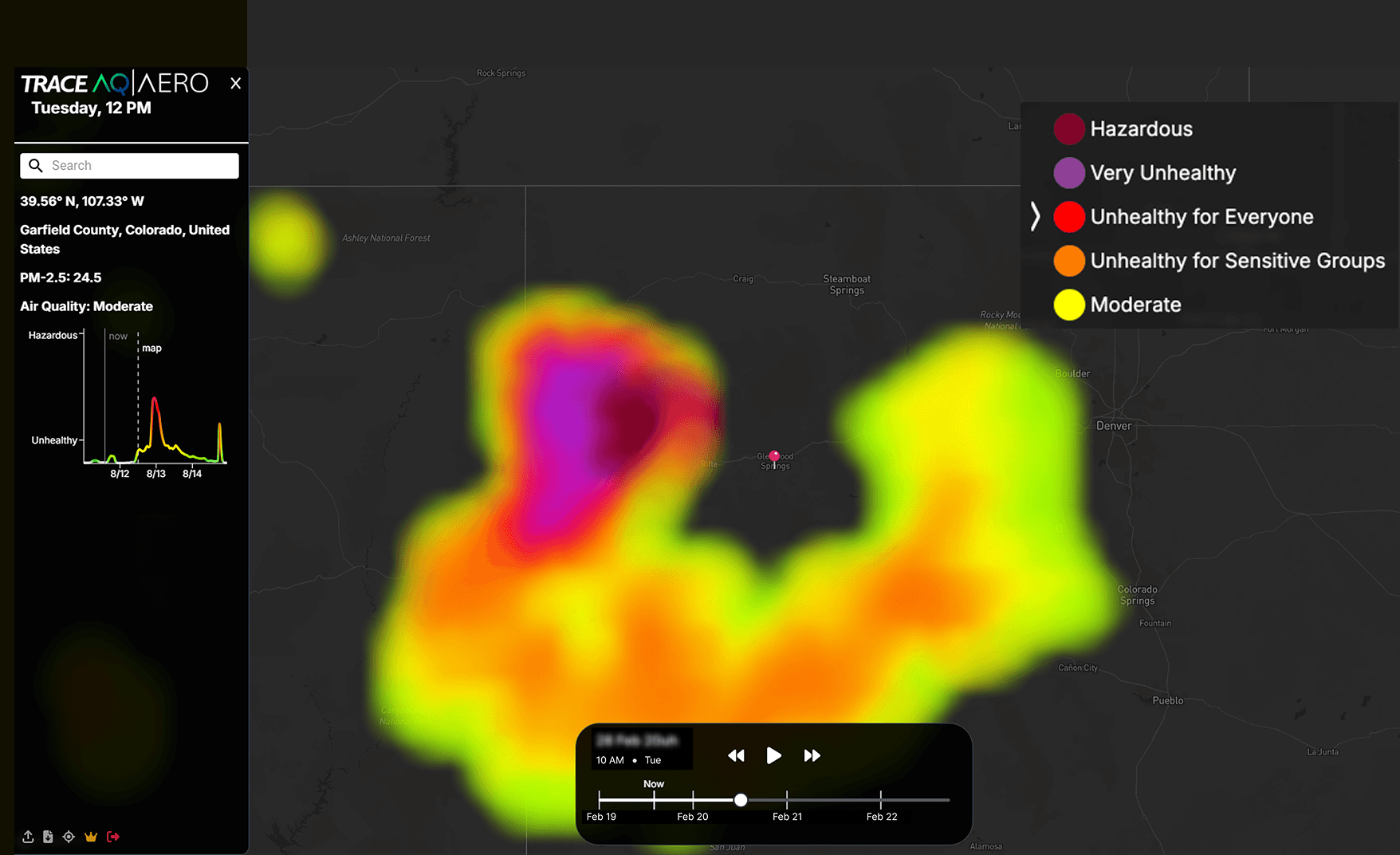
  • Heatmap + time-lapse map interface

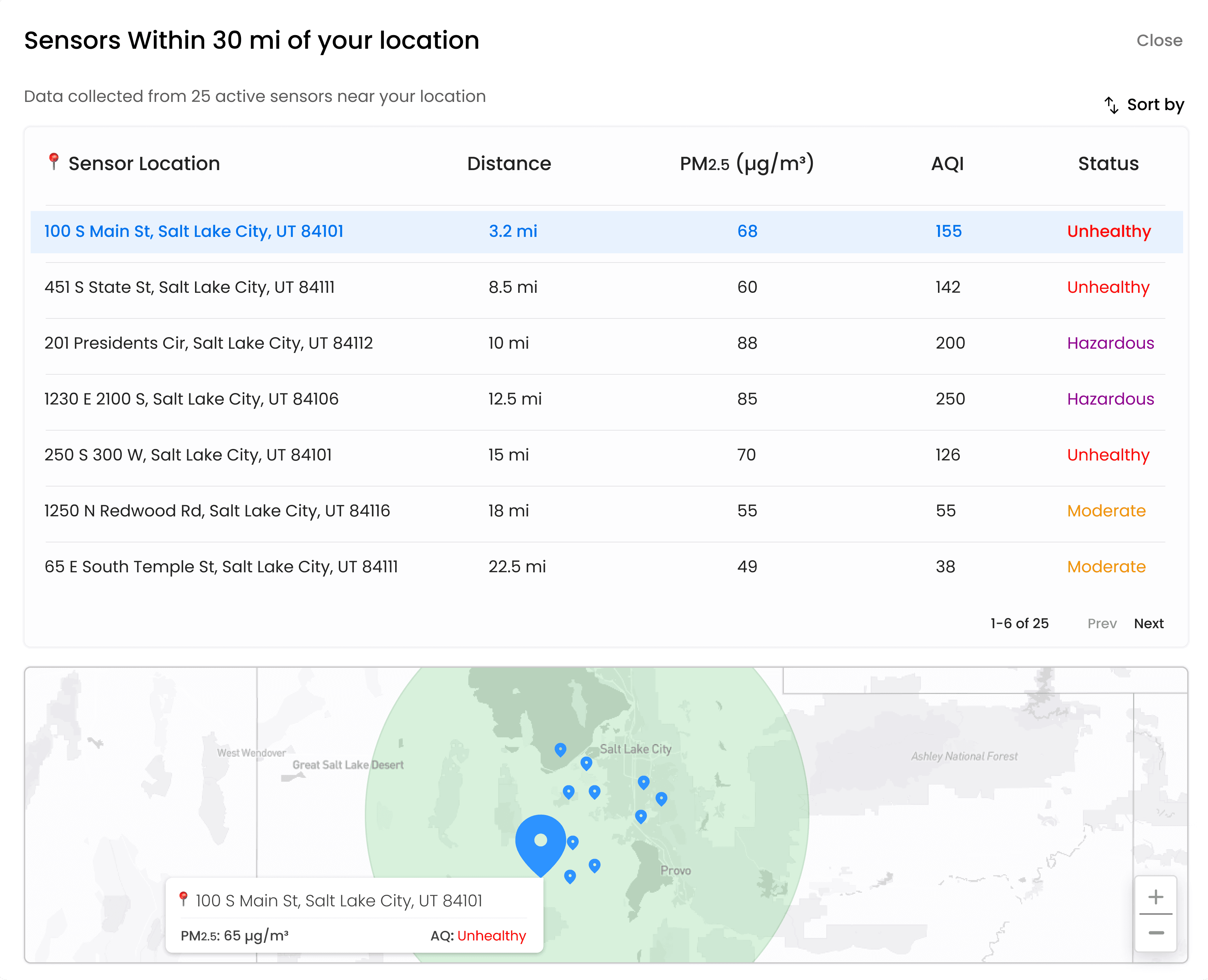
  • Sensor network data table

  • Mobile-responsive data views

Enterprise Admin & Workflows

Multi-role admin systems, user management, billing controls, and self-serve checkout, standard enterprise B2B product architecture.


  • System Admin - all orgs, users, billing

  • Customer Admin - org-level self-service

  • Role-based permissions

  • Checkout & payment flow

End-to-End Systems Design

Designed the full system around the product, prospect journey, acquisition materials, and go-to-market infrastructure from scratch.


  • Prospect journey mapping

  • Landing page

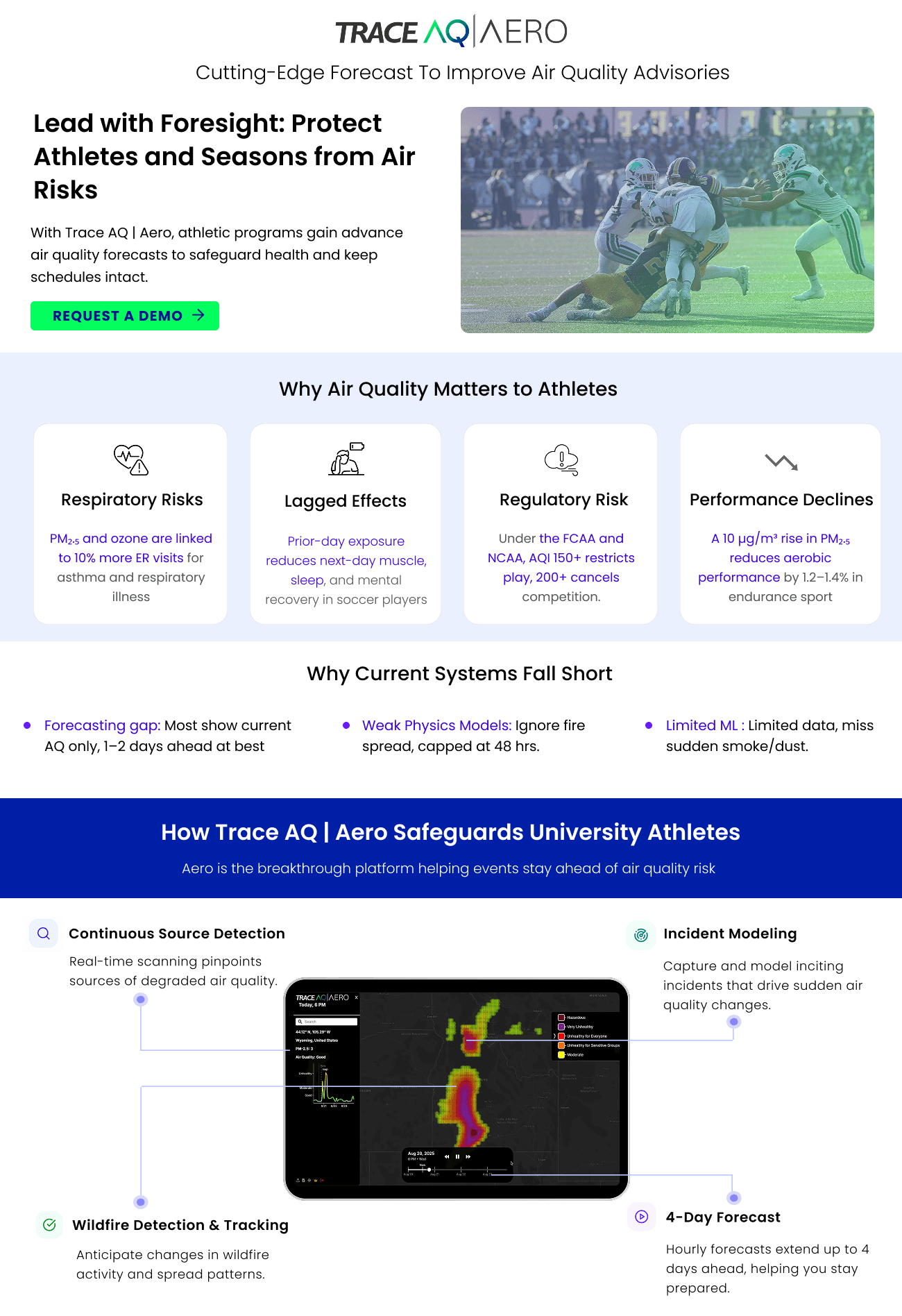
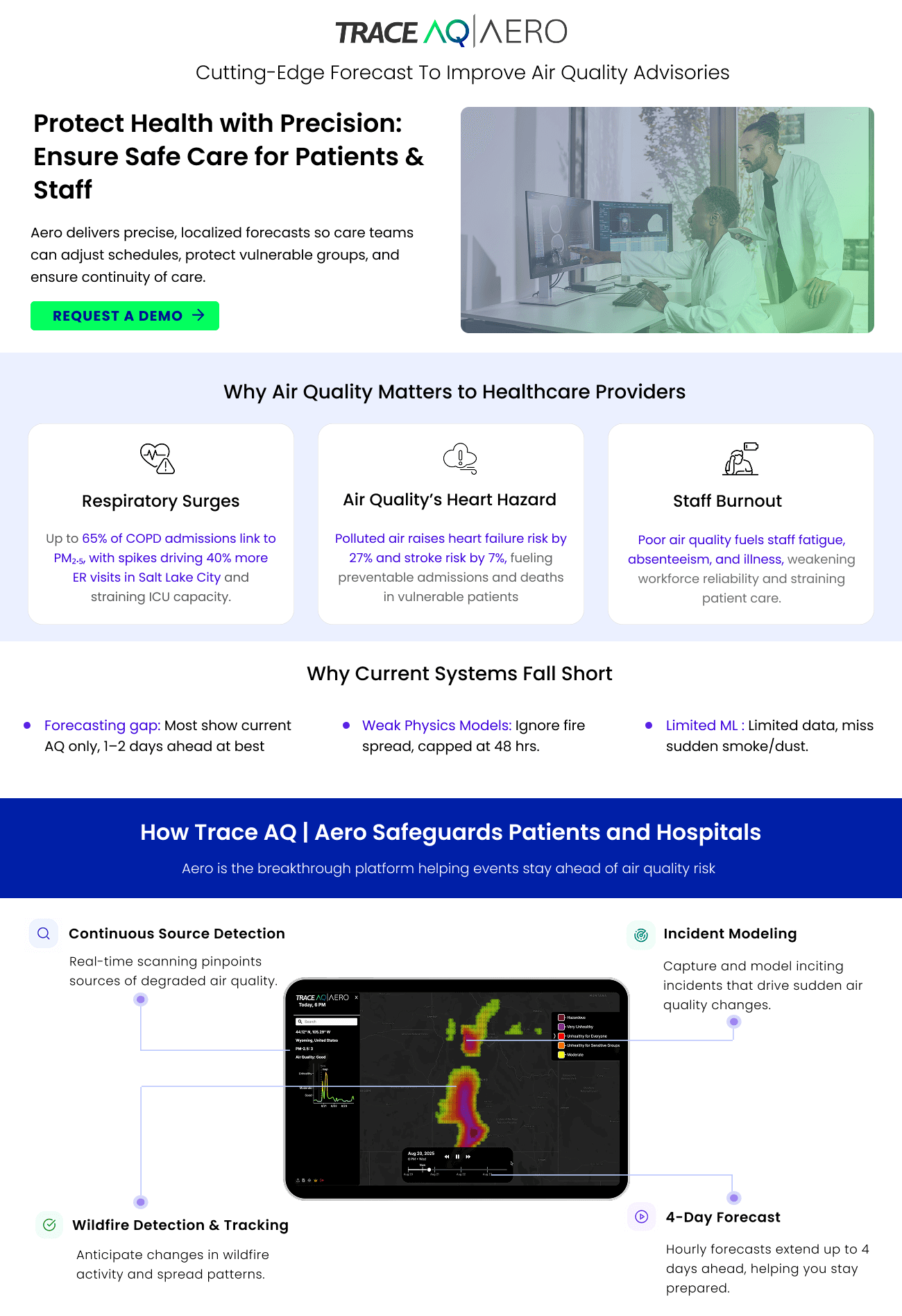
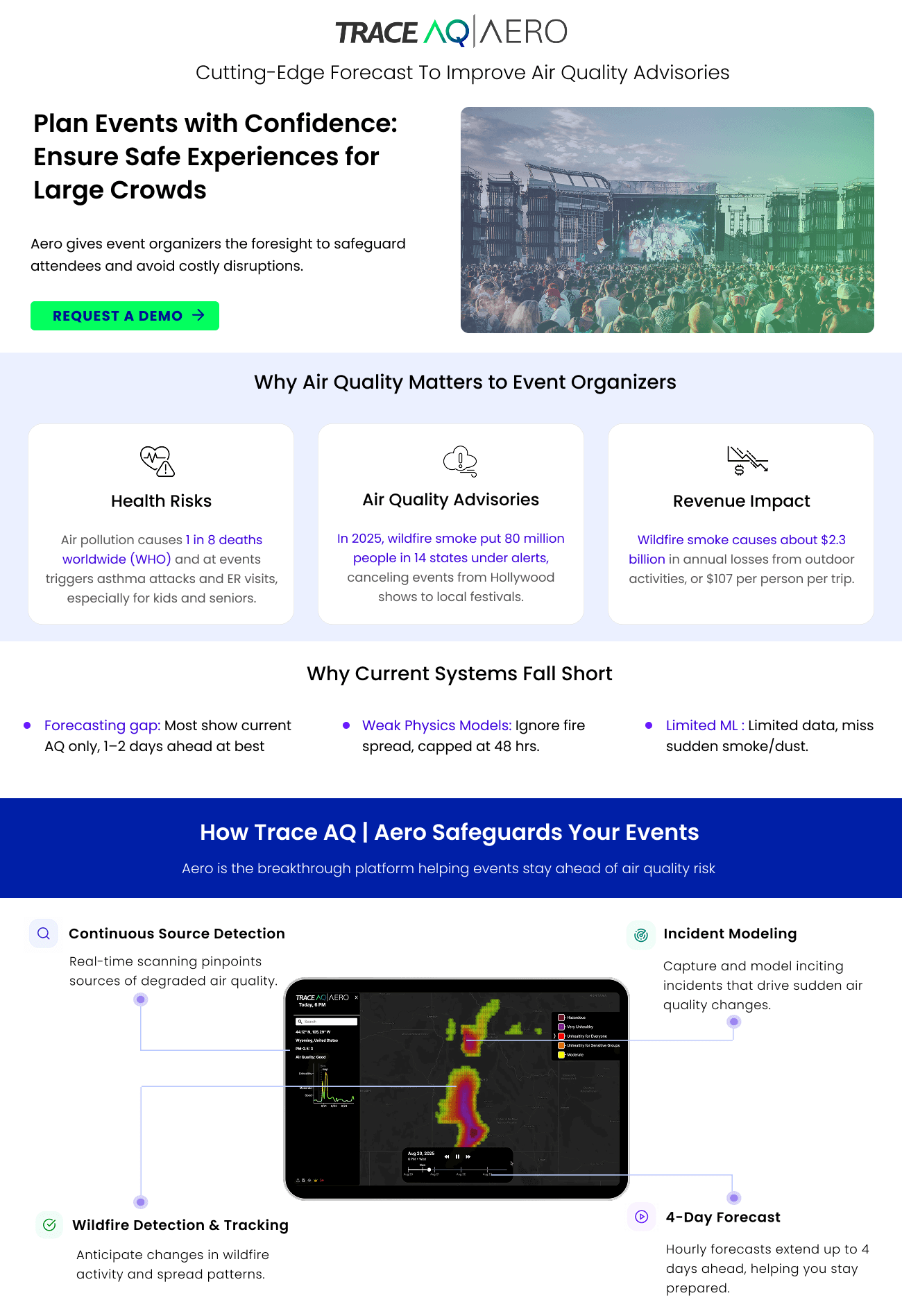
  • 3 audience-specific one-pagers

  • V1 → V2 full redesign

10+

Enterprise customers

Hospitals, schools & work zone companies across CA, UT & CO

3

Industries served

Healthcare, education & construction / work zone management

400%

More accurate

Than competitors on unhealthy AQ events, Fire Season 2025

PRODUCT DEMO

Product Walkthrough Video

Four surfaces. Each one closed a specific gap from V1.

THE PROBLEM

A technically advanced product with a UX gap

Trace AQ built a Physics-ML Fusion engine that forecasts air quality 4 days ahead at any US location. The technology was strong. The product and the system around it needed work.

V1 was a dark-mode research tool built for scientists, no structured panel, no forecast chart, no data export. Beyond the product, there was no landing page, no admin layer, and no purchase path.

I redesigned the product and built the full go-to-market system from scratch.

Core insight: The existing product prioritized map visualization over operational usability, making it difficult for users to interpret and act on air quality data, especially for the non-scientific enterprise audiences it needed to serve.

nice interior
nice interior
V1 · Original · Research-only


Heatmap overlay · Basic sparkline · No structured panel · No forecast chart · No sensor detail · No data export · No admin layer · No purchase path

nice interior
nice interior
V2 · Redesign · Enterprise platform


Structured data panel · Current AQ + 4-day forecast · Risk band labels · PM2.5 + AQI · Forecast chart modal · Sensor network table · Data export · Admin layer · Checkout flow

Finding that shaped go-to-market: Same forecast data, five completely different reasons to care about it. One general one-pager would serve none of them. I designed three audience-specific documents instead — each written from scratch in the audience’s own language.

DESIGN PROCESS & ITERATION

How the product evolved from V1 to V2

Design Process & Iteration

The redesign went through multiple concept phases in Figma. Starting with V1 dark mode, exploring light mode concepts, refining the information hierarchy, and finalising the enterprise V2.

01

Reduce Cognitive Load
  • Structured card-based layout

  • Consolidated controls

  • Clear visual grouping

  • Simplified map interface

  • Progressive disclosure

02

Improve Data Clarity
  • AQI as primary layer over PM2.5

  • Risk band labels on charts

  • Cleaner forecast visualization

  • Structured sensor tables

  • Non-color signal system

03

Support Operational Workflows
  • Sensor drilldown modals

  • Sortable sensor tables

  • Expandable forecast analysis

  • Downloadable datasets

  • Search with recent history

04

Scalable System Architecture
  • User profile system

  • System Admin foundation

  • Customer Admin layer

  • Reusable UI components

  • Consistent interaction patterns

A key moment during technical design reviews

The system outputs PM2.5. The world doesn’t understand PM2.5.

When presenting early designs to the technical team, the CTO walked me through a key constraint: the system outputs values in PM2.5 (μg/m³). Scientifically precise, and the natural technical output. My concern: none of our five enterprise audiences, hospital administrators, school principals, event organizers, work zone managers, know what 65 μg/m³ means or whether to act on it.


I advocated for converting PM2.5 to AQI, the EPA’s publicly recognized scale, and integrating the established category labels (Good, Moderate, Unhealthy, Hazardous) throughout the interface. Raw PM2.5 stayed visible for precision users. AQI became the primary communication layer.

Why this mattered: A scientist reads PM2.5 for precision. A hospital administrator reads “Unhealthy” and knows to prepare. An event organizer reads “Hazardous” and cancels. Same data, every enterprise audience served simultaneously.

KEY FETAURES

What shipped in V2

The redesign went through multiple concept phases in Figma before landing on the final direction. Starting with the dark-mode V1, exploring early light-mode concepts, refining the information hierarchy, and finalizing the enterprise-grade V2.

From dark research tool to enterprise platform

They initially oriented on the basic structure of the homepage and highlight the intended function of each element.

Five main surfaces. Each one addresses a specific problem from the audit and a specific need from user research.

INFORMATION HIERARCHY

FEATURE 1: MAIN DASHBOARD

Structured information hierarchy replacing floating panels

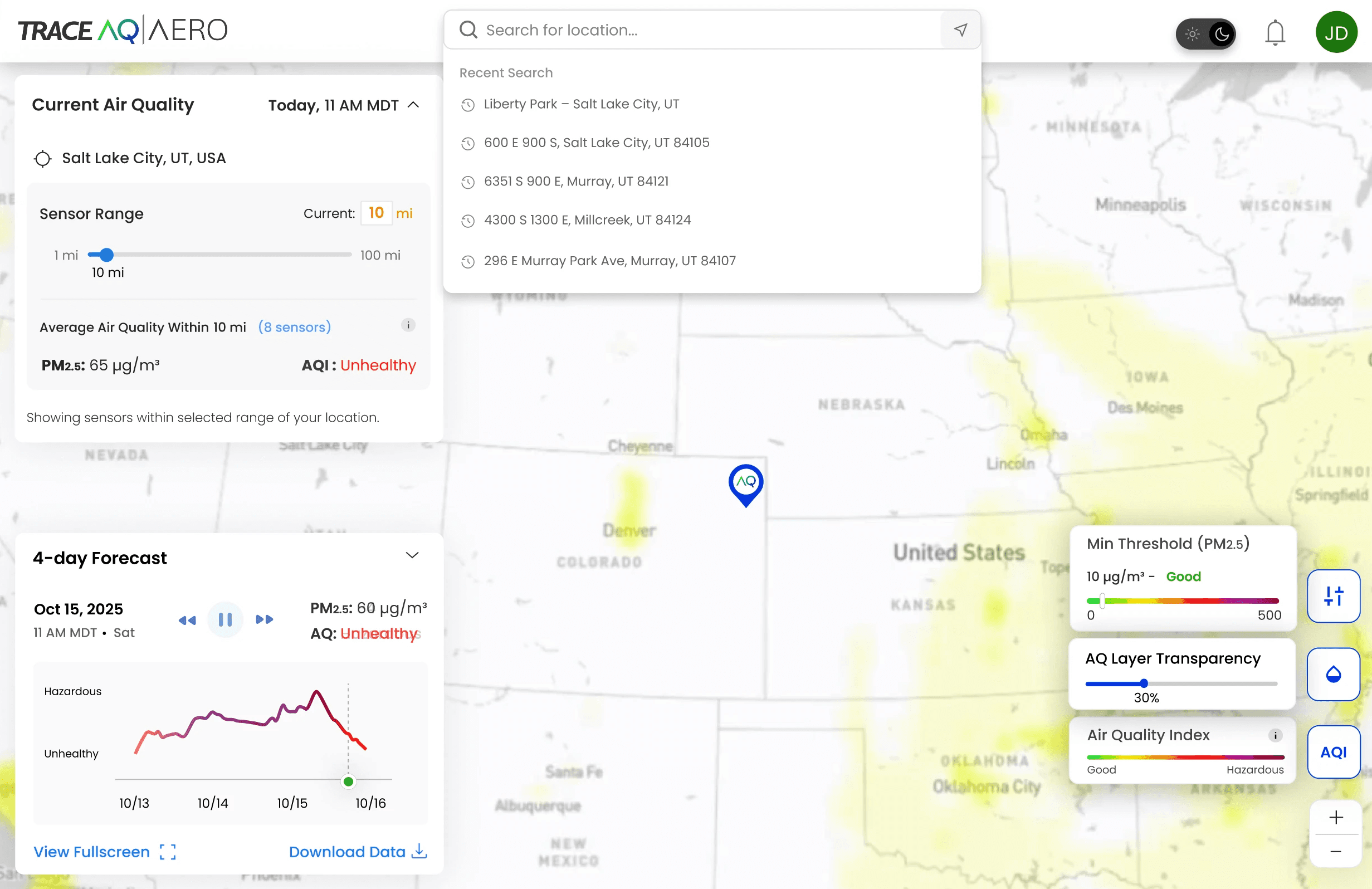
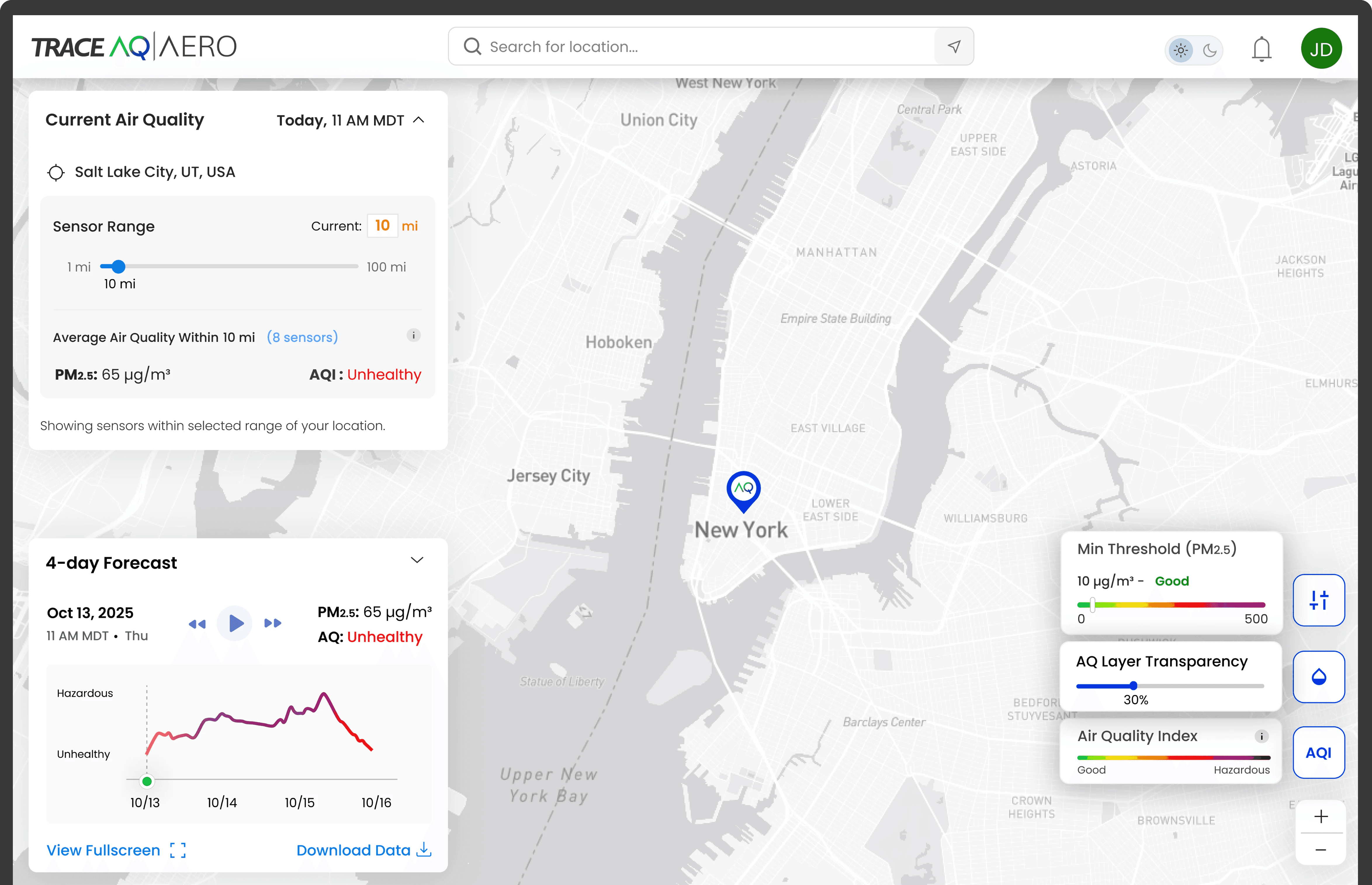
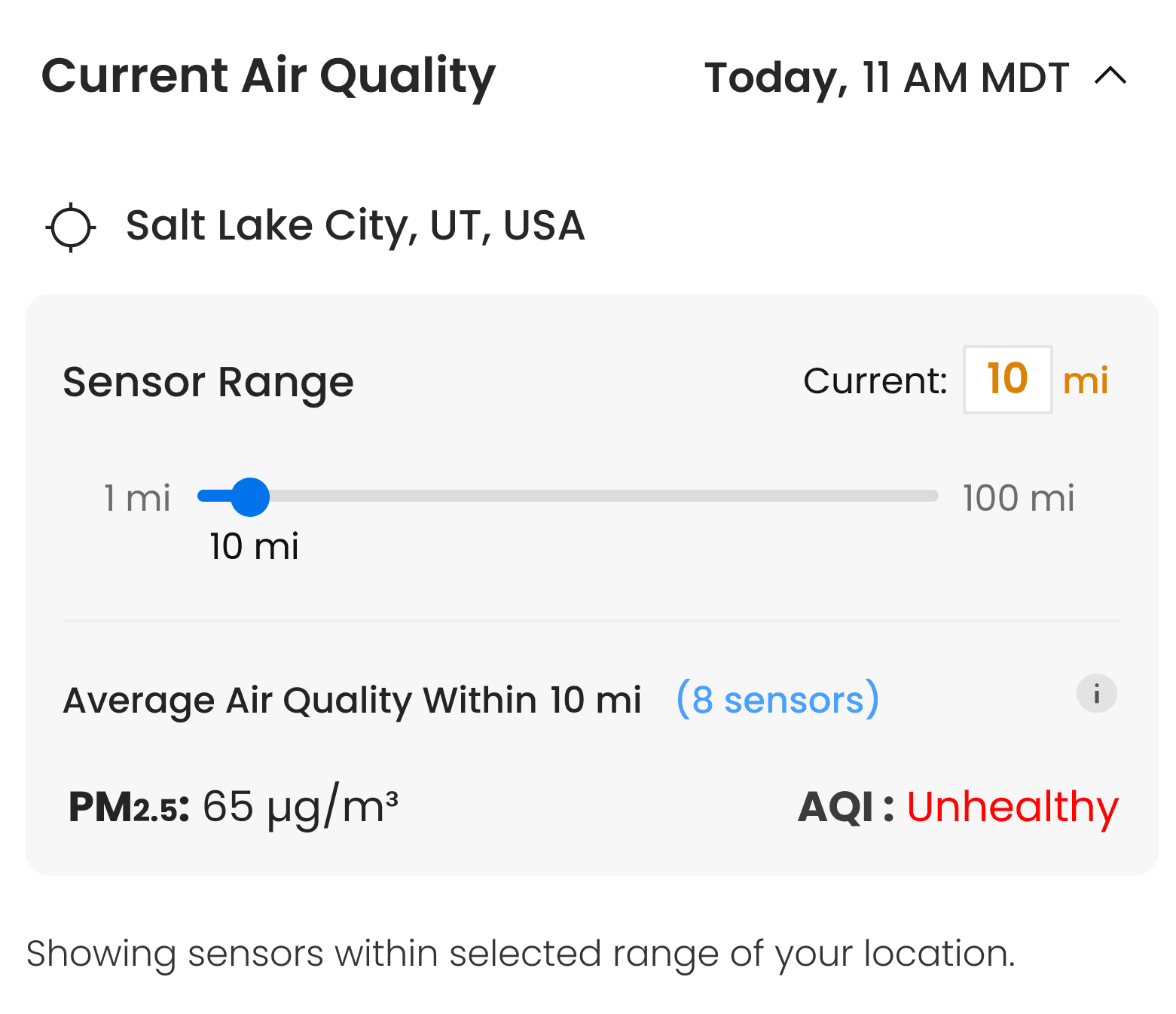
Left panel answers both core questions, what is AQ right now and what will it be over the next 4 days, without any clicks. Sensor range slider (1–100 mi) lets enterprise users control the geographic scope of data aggregation.


V1 gap closed: No structured panel existed. Users had to interpret the heatmap color to understand conditions.

Voo's High-fidelyty prototype

DATA VISUALIZATION

FEATURE 2: FORECAST ANALYTICS

Expandable analytical forecast module with risk bands

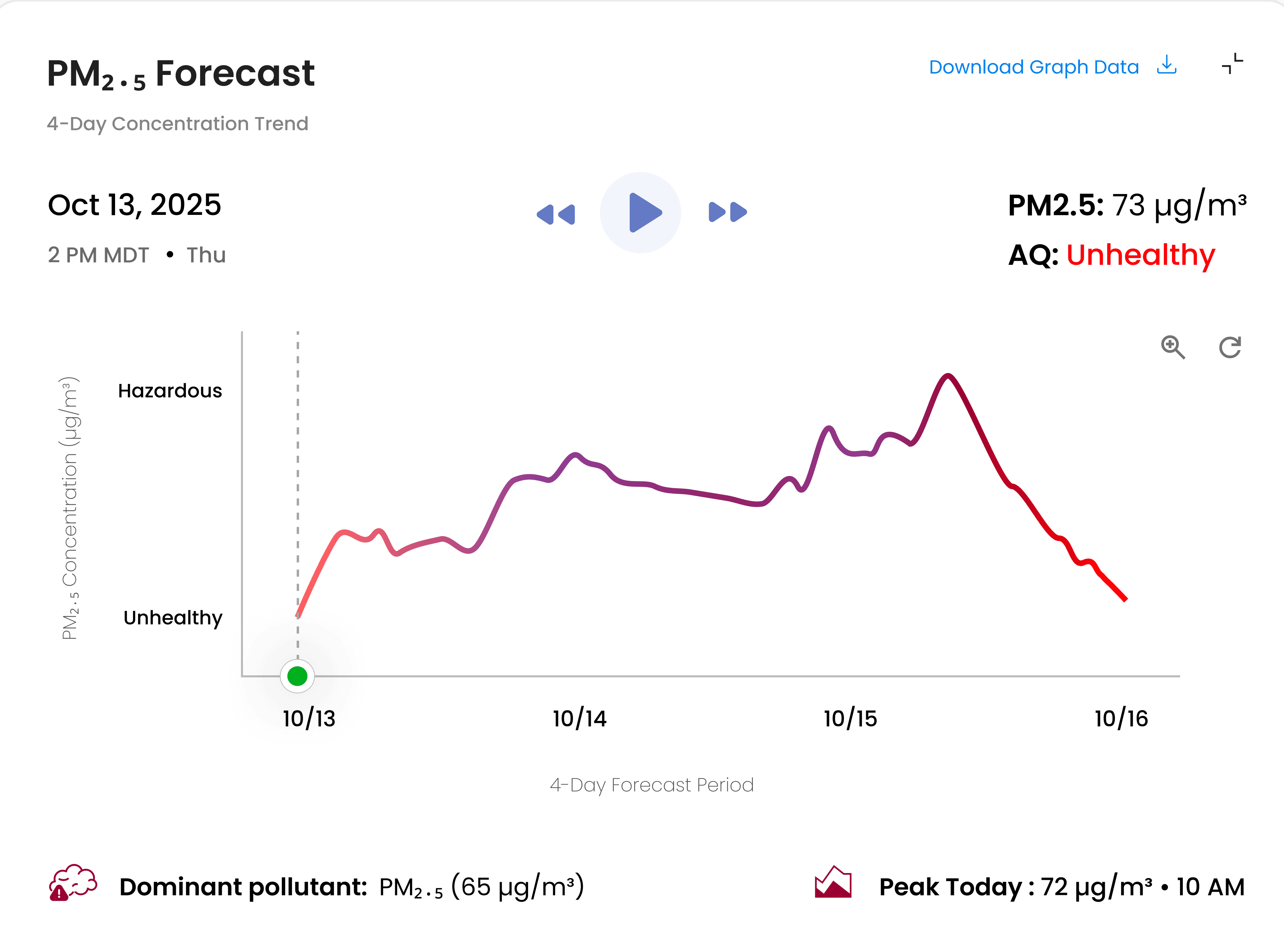
New in V2. Hourly resolution over 4 days. Risk band labels (Hazardous, Unhealthy) on the Y-axis so users don’t need to memorize thresholds. Peak today, dominant pollutant, and data download all surfaced in one modal.


Design decision: AQI labels carry the interpretation. Numeric PM2.5 values stay for users who need precision. Both present — labels are primary.

OPERATIONAL WORKFLOW

FEATURE 3: SENSOR INTELLIGENCE MODAL

Sortable sensor drilldown with geospatial context

New in V2. Enterprise users managing multiple facilities or outdoor sites need sensor-level data, not just a regional average. Sortable by distance, PM2.5, AQI, or status. Mini map contextualizes the geographic distribution.


Who this serves: Scientists issuing regional advisories, work zone managers tracking multiple sites, hospital systems across multiple facilities.

Voo's High-fidelyty prototype

MAP INTERACTION

FEATURE 4: AQ LAYER CONTROLS

Improved threshold controls and map readability

Redesigned AQ controls panel with clear threshold filtering (Min Threshold PM2.5 slider), improved AQ layer transparency control, and a clean Good–Hazardous legend. Right-side toolbar consolidates map interaction controls without cluttering the main view. Dark/light mode toggle for different working environments.

Audit finding addressed: Hard-to-understand AQ controls and heavy reliance on color. Transparency and threshold controls give enterprise users precise control over what they see.

CROSS-PLATFORM

Desktop and mobile

Four surfaces. Each one closed a specific gap from V1.

Voo's High-fidelyty prototype

SYSTEM DESIGN - ADMIN & GO-TO-MARKET - PAYMENT UX

Beyond the product interface

Prospect journey mapping revealed the product had no acquisition path. I designed the admin layer, checkout flow, and full go-to-market system alongside the V2 product redesign.

Admin Layer

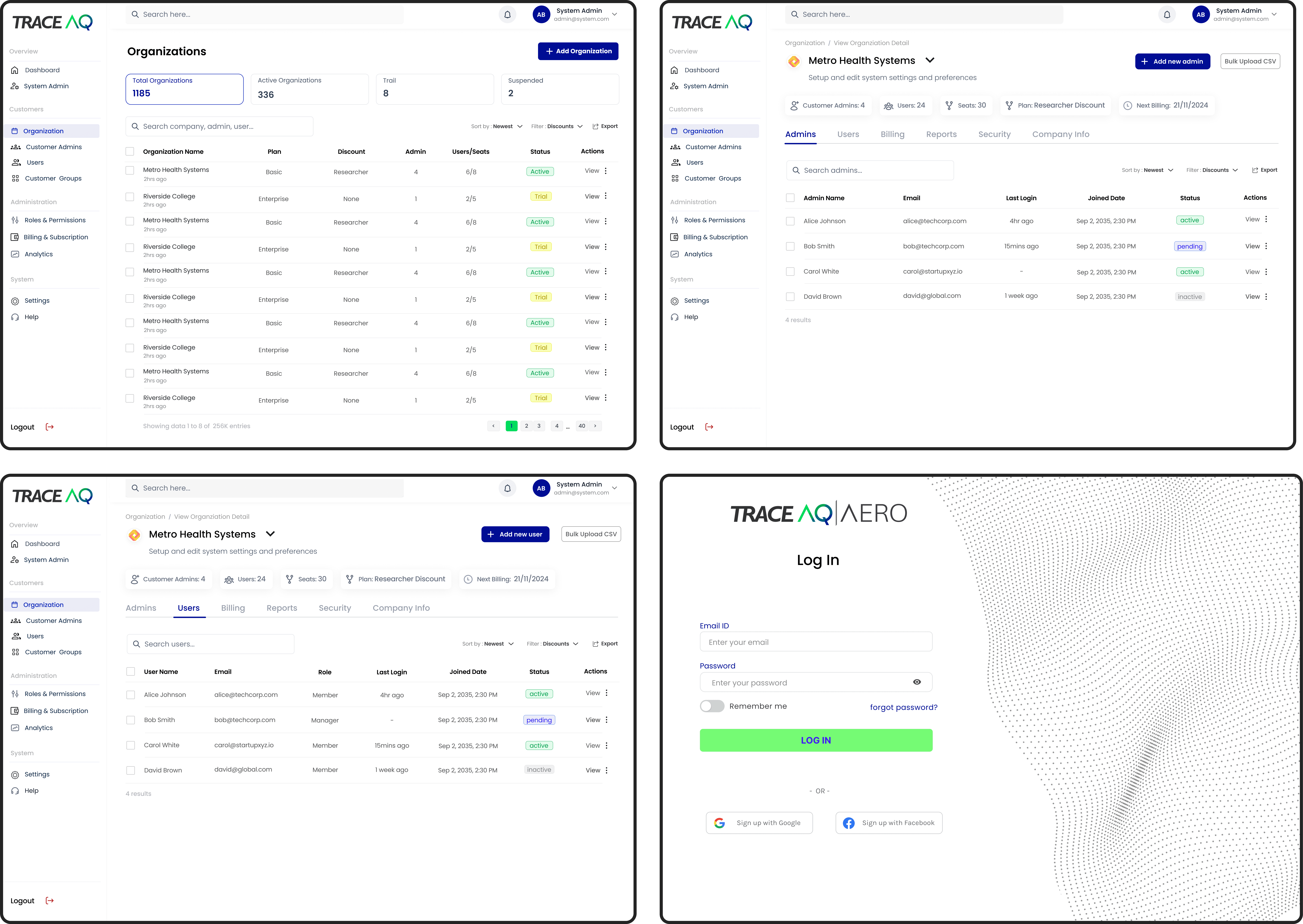
System Admin - Trace AQ manages all customer organizations (1,185 total), user accounts, billing, and permissions across the full platform.

Customer Admin - enterprise clients manage their own users, seats, billing, and security settings without contacting support.

nice interior

MULTI-AUDIENCE MARKETING

3 One-Pagers for 3 Audiences

Same product, three different stories. I wrote and designed each one from scratch — scientists (physics credibility), healthcare (patient outcomes + ICU operations), events (revenue protection + cancellation avoidance).

nice interior
nice interior
nice interior

Scientists (physics-ML credibility + researcher discount) · Healthcare (patient outcomes + ICU operations, 65% of COPD admissions link to PM2.5) · Events (revenue protection + cancellation avoidance, $2.3B in annual smoke losses)

IMPACT

UX, product, and business improvements

Design Process & Iteration

UX IMPROVEMENTS

Usability & Clarity
  • Improved readability and discoverability

  • Reduced visual clutter significantly

  • Faster access to sensor intelligence

  • Better interpretation of AQ forecasts

  • AQI labels eliminated PM2.5 interpretation burden

  • Mobile experience for field users

PRODUCT IMPROVEMENTS

Scalable Architecture
  • Scalable dashboard architecture created

  • Operational workflows introduced

  • User & admin management system built

  • Self-serve checkout, product became purchasable

  • Two-layer admin system for enterprise clients

  • Consistent design system across all surfaces

BUSINESS IMPACT

Enterprise Readiness
  • 10+ enterprise customers across 3 industries

  • Healthcare, education & work zone markets served

  • 3 vertical one-pagers supporting sales

  • 400% better accuracy than competitors

  • Stronger positioning for enterprise contracts

FINAL TAKEAWAY

This redesign is NOT just a visual refresh.

It demonstrates dashboard UX, data visualization, operational workflows, enterprise admin architecture, go-to-market systems design, and product strategy, in one connected body of work. The domain is air quality. The skills transfer anywhere.